dreaMote Lite1.7.11
Publisher Description
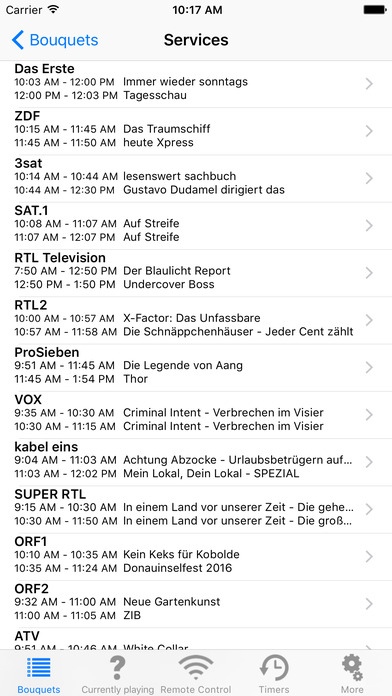
A remote control application for Enigma2, Enigma, Neutrino, VDR and TitanNit based set-top-boxes.
Features:
Show Bouquets/Favorites, zap and show EPG
Show currently running program
Create, delete and modify timers
Show and delete recorded movies and start playback on the receiver
Create and restore Backups (Enigma2)
Emulated remote control
Show screenshots (Enigma/Enigma2/NeutrinoHD)
Signal Finder
Package Management (only Enigma2)
Volume and power control
Send messages
MediaPlayer frontend (only Enigma2 and regular MediaPlayer)
Show information on hard-/software of receiver (Enigma2)
Search EPG (native on Enigma2, TitanNit, NeutrinoHD, emulated on remaining receivers)
Control EPGRefresh-Plugin (Enigma2)
The backends are developed with focus on the most recent software, but compatibility is kept to old versions where possible.
Bouquets (Enigma, Enigma2, Neutrino, TitanNit)
dreaMote retrieves and displays the user-bouquets as configured on the receiver. That means if there are no bouquets, you will be unable to see any services.
Screenshots
You can save the current screenshot by holding your finger on it for one seconds. You can find saved screenshots in the picture reel.
Streaming (Enigma, Enigma2, Neutrino)
dreaMote does not contain a video player at the moment. To start playback of a video stream you have to have a supported Streaming-App installed. As of now these are OPlayer (HD) (including the free Lite version), BUZZ Player, yxplayer, GoodPlayer, AcePlayer and VLC.
EPGRefresh
Requires the EPGRefresh-Plugin from the current "experimental"-Tree of Enigma2. Functionality is not given with versions older than 2011/05/21.
VPS (Enigma2)
To enable/disable VPS a recent version of the VPS-Plugin has to be installed. The functionality is not present or broken for versions older than 2012/01/25 (experimental).
Please consider buying the Pro version if you like this software? Here are just a few reasons
No advertisements
Support of future development (there are already over eight years of work put into dreaMote)
Multi-EPG
Emulated EPG-Search for non-Enigma2-Receivers
(Enigma2) AutoTimer-Support
Preferred (earlier and possibly more often) updates
More Features (and thereby reasons to buy the paid version) to come with future updates
Please be aware of that fact that we cannot add features that the hardware does not support. This includes starting your receiver remotely if it was turned off and emulating remote control buttons that the original remote control does not have. Sorry!
*** If you have any problems please contact the support either via the email button in about or using the sheet found on the support page as we are unable to reply to reviews. ***
Follow dreaMote on Twitter: @dreaMote
Requires iOS 7.0 or later. Compatible with iPhone, iPad, and iPod touch.
About dreaMote Lite
The company that develops dreaMote Lite is Abshoff, Agricola, Prager & Venn GbR. The latest version released by its developer is 1.7.11.
To install dreaMote Lite on your iOS device, just click the green Continue To App button above to start the installation process. The app is listed on our website since 2011-02-23 and was downloaded 21 times. We have already checked if the download link is safe, however for your own protection we recommend that you scan the downloaded app with your antivirus. Your antivirus may detect the dreaMote Lite as malware if the download link is broken.
How to install dreaMote Lite on your iOS device:
- Click on the Continue To App button on our website. This will redirect you to the App Store.
- Once the dreaMote Lite is shown in the iTunes listing of your iOS device, you can start its download and installation. Tap on the GET button to the right of the app to start downloading it.
- If you are not logged-in the iOS appstore app, you'll be prompted for your your Apple ID and/or password.
- After dreaMote Lite is downloaded, you'll see an INSTALL button to the right. Tap on it to start the actual installation of the iOS app.
- Once installation is finished you can tap on the OPEN button to start it. Its icon will also be added to your device home screen.
